VEHICLE EXPLORER FIX FOR V1.4.0.0/V1.4.0.1, Farming Simulator 2022 için hazırlanmıştır. Bu script ve araç modu için öne çıkan özellikler ve uyumluluk ayrıntıları aşağıda yer alır.
This is a revamp of the good old VehicleSort from FS17.
For beginners: VehicleExplorer helps you organize your vehicles, by showing you a list which can be organized, well, sorted by you. Besides that it has a couple of additional functionality. See below.
Öne Çıkan Özellikler
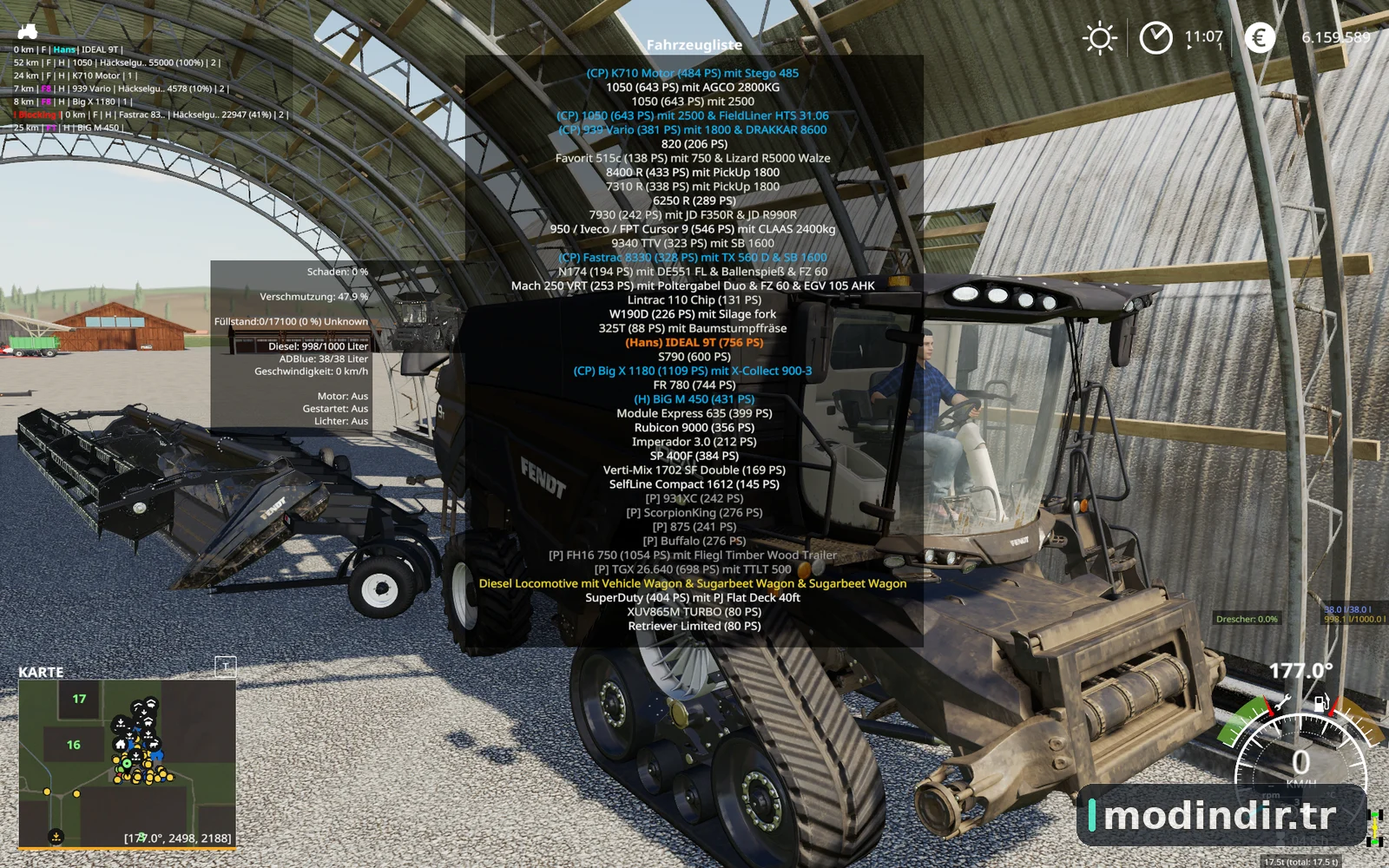
List of all steerable vehicles (Specialization: Enterable).
Set a customer order for your vehicles.
Your order is saved in the default vehicles.xml, so no additional clutter.
Enter your vehicles directly with a click of a (mouse) button.
This is meant literally, see known issues 😉.
EasyTab: Switch between the last two selected vehicles.
Park your vehicles, so that a switch of vehicles via Tab ignores them.
Repair vehicles and its implements.
Let your vehicle and implements get cleaned on a repair from your friendly VeEx staff 😉.
If Seasons is enabled, you can also let the vehicle and implements get repainted.
Displaying a store image next to the list.
Info box with additional informations.
Motor on/off, turned on/off (for e.g. harvester) and light status is saved and restored.
Different colors in the list if a vehicle is selected, or currently used by a helper/Courseplay.
Config Menu
Config is saved per savegame within modsSettings/VehicleExplorer/savegameX.
Show/hide trains in the list
Show/hide station cranes in the list (No idea if that actually works, would need a map with a crane to test).
Show/hide steerable implements/trailers (e.g. forwarder trailer with crane).
Show/hide brand names in the list.
Show/hide your own name when you enter a vehicle.
Show/hide horse power in the list.
Show/hide fill levels in the list.
Show/hide implements in the list.
Show/hide store images
Show/hide infobox
Move infobox up/down
Show/hide a background for the infobox/store image.
Change text size
Change text alignment
Change list background transparency.
Enable/disable saving of the additional vehicle status (motor, turnedOn, lights).
Show/hide keybindings in the game F1 help menu (needs a game restart to take affect).
Clean vehicle & implements on a repair.
Tardis integration
With Tardis you can teleport yourself AND your vehicles to any position on the map.
With VehicleExplorer & Tardis you can select a vehicle on the list, and teleport that to any location without entering it. You can also configure if you want to enter the vehicle after teleportation or just drop the vehicle to another location.
With Tardis Map Hotspots you can again, select a vehicle and quickly teleport that to one of those hotspots.
Bilinen Sorunlar
Although you can change all the keyboard bindings, the mouse actions are hardcoded for now.
Left mouse click: Enter vehicle.
Right mouse click: Select vehicle (to e.g. move it).
Right mouse click: Change value in the config menu.
Mouse wheel: Selection up/down in list.
Max of three columns. If you’ve more vehicles (which would be insane anyways 😉 , just disable the display of brand name etc.
Incompatible Mods
SpeedControl
Actually both work fine side by side. There is just a keybinding overlap. So you’ve to set new keybindings through the game menu for Key 1, Key 2, Key NumPad Plus, Key NumPad Minus.
Changed the default keybinding. So there is no overlap anymore.
Default Keybinding
Key Combi Action
LAlt + v Show/hide vehicle list.
LAlt + KeyPad Minus Show/hide config menu.
KeyPad Enter Enter vehicle
LAlt + p Toggle parking
LAlt + KeyPad 5 Select item (for moving the vehicle) or to change values in the config.
LAlt + KeyPad 8 Move up in the list/config.
LAlt + KeyPad 2 Move down in the list/config.
LAlt + 1 Move up fast in the list/config.
LAlt + 2 Move down fast in the list/config.
LAlt + R Repair vehicle incl. implements.
Tab Next vehicle; VeEx own switch vehicle implementation (necessary to tab through vehicles in your own order).
Shift + Tab Previous vehicle; VeEx own switch vehicle implementation (necessary to tab through vehicles in your own order).
LCtrl + Tab easyTab; Easily tab between the last two vehicles you switched through VeEx.
Mouse Left Enter vehicle
Mouse Right Select item / değişim değerleri yapılandırın.
Mouse List up /down
- •‘sorted sekmesini kullanmak istiyorsanız, oyun menüsünde varsayılan anahtar bağlayıcıyı bıraktığınızdan emin olun. Varsayılan araç geçişini yazmanın bir yolunu bulamadım ve size izin vermek daha iyi olduğunu düşünüyorum, kullanıcı, bu seçim her neyse.
Kullanılan renkler Anlamı
Renk Anlamı
Beyaz Standart
Green Current player araç kontrol ediyor.
Orange Vehicle seçilmiş
Kırmızı araç kilitlendi (Listede yukarı / aşağı hareket etmek için gerekli).
Grey Vehicle parked
Blue Vehicle AI tarafından kontrol edilir (Yardımcı veya Dersplay).
Light Pink Vehicle TakipMe ( henüz mevcut değil) tarafından kontrol edilir.
Sarı Motor çalışıyor
Mevcut sürümin multiplayer desteklemediğini unutmayın!
AraçExplorer'in sadece moddesc.xml'i değiştirirseniz MP'de çalıştığını bildiriyordu. Her şeyin o zaman işe yaramadığını varsayıyorum. Her neyse, bir MP versiyonu üzerinde çalışmaya karar verdim. Sadece mevcut olduğunda henüz bir fikri yok.
Öncelikle Dschonny & Slivicon'a. En azından bunlar, bir temel olarak kullandığım FS17 AraçSort'da belirtilen isimlerdir. Ancak kod çoğunluğu her zaman değişti. Ayrıca Kudos'un çocuklar ve gals From CoursePlay, AraçInspector, AraçFruitHud, GeliştirilmişVehicle ve bazı ilham ve fikirler için daha fazlası. Ek olarak Üye Ol Özelleştirme senaryosu için.